
The AI Workflow That Saves Me Hours Every Week
How I use AI across research, ideation, UI, copy, and prototyping to move from user problems to validated solutions - including Figma MCP as the link between the file I design and the prototype I build in Cursor.

Design is no longer a linear process of research → wireframes → UI → prototype. With AI, it has become a continuous loop between insight, ideation, design, and interaction.
In my work as a product designer, I use AI to move faster from user problems to validated solutions - without compromising depth, clarity, or design quality.
The modern AI design workflow
At a high level, my workflow looks like this:
UX Research → Insight Synthesis → Ideation → UI Design → UX Writing → Prototyping → Validation
     ↓              ↓                ↓           ↓            ↓             ↓
 Condens        AI clustering   Figma Make   Figma UI    ChatGPT      Cursor
                                      & Cursor               (copy)    via Figma MCP
This is not a linear process anymore. It’s iterative, fast, and AI-supported at every stage.
1. From research to real insights (Condens AI)
Every product decision starts with understanding user problems.
I begin with qualitative research such as interviews, usability tests, surveys, and support feedback. Using Condens, I let AI cluster and structure this data into themes.
Instead of manually reviewing notes, I can quickly identify:
- recurring user pain points
- behavioral patterns across interviews
- friction in key flows
- opportunity areas for improvement
The goal is simple: ensure I am solving the right problem before designing anything.
2. From insight to direction (Figma Make & Cursor)
Once the problem is clear, I move into structured exploration.
At this stage, I use AI to expand the solution space before narrowing it down. Figma Make helps generate UI directions and layout variations, while Cursor helps me think through interaction logic and early flow structures.
I explore:
- different ways of structuring the experience
- alternative user flows
- feature variations
- interaction patterns
This step is about divergence before convergence. I make sure I don’t jump too early into a single solution.
3. Designing the solution (Figma + ChatGPT)
After selecting a direction, I move into high-fidelity design using Figma and the design system as a foundation.
While designing, I use ChatGPT as a UX writing partner to refine microcopy and ensure consistency across the interface.
Typical outputs include:
- button and CTA labels
- onboarding and guidance text
- error and success messages
- empty states and system feedback
Instead of writing copy in isolation, I iterate quickly through multiple variations and refine based on clarity, tone, and context.
4. From static UI to real interaction (Figma MCP + Cursor)
High-fidelity screens are still only a snapshot. The next step is making the flow feel real enough to test, without losing what I already decided in Figma.
That is where Figma MCP (Model Context Protocol) sits in my workflow. It is the live connection between the Figma file and Cursor. Instead of exporting PNGs, copying specs by hand, or hoping the model guesses layout from a screenshot, Cursor can read the actual file: frames, components, spacing, and structure.
In practice, I stay in Figma through design, then switch to Cursor for prototyping without breaking the thread. I point the agent at a specific frame or flow, ask it to build the interaction, and check the result against the design I just made. If the prototype reveals a clumsy step, I go back to Figma, adjust the UI, and pull the update through MCP again.
That loop is the communication layer between design and prototyping:
- Figma holds the visual source of truth
- MCP gives Cursor live context from that file
- Cursor turns screens into clickable, testable behavior
- what I learn in the prototype feeds back into the Figma file
At this stage, I focus on:
- validating interaction flows
- testing edge cases
- refining user logic
- identifying friction before development
It turns design from something static into something testable, while keeping both tools in sync.
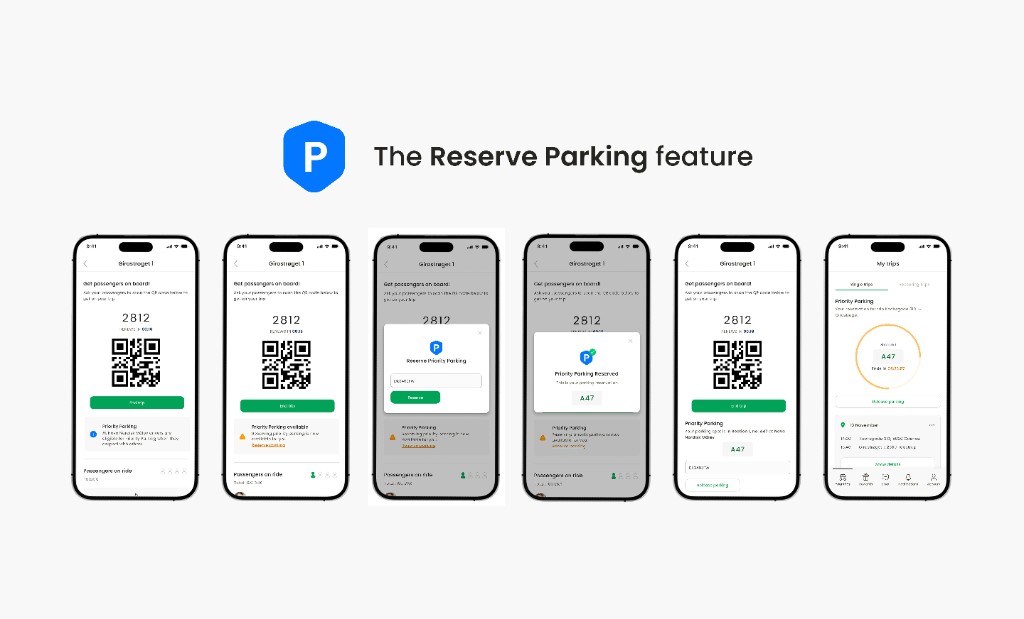
Real example: Parking reservation in Nabogo
I applied this workflow when designing a new feature for Nabogo ApS, a carpooling platform used across Northern Europe.
Insight (Condens AI)
Through user research, a clear pattern emerged:
Users who carpool to work often struggle with parking availability near their office, especially in dense urban areas.
Key needs included:
- predictable parking near destination
- reduced walking distance
- better coordination between shared commuters
This became the foundation for the feature.
Ideation (Figma Make & Cursor)
I explored multiple solution directions using AI-assisted ideation, including:
- parking tied to specific rides
- office-based parking zones
- shared parking allocation for recurring carpools
This exploration helped refine the concept into a single solution: reserving parking directly during ride planning.
Design + UX writing (Figma + ChatGPT)
I designed the feature within the Nabogo design system, ensuring consistency with existing components and patterns.
ChatGPT helped refine key microcopy, especially around:
- availability states
- booking confirmations
- system feedback messages
The focus was clarity and reducing uncertainty during booking.
Prototyping (Figma MCP + Cursor)
Finally, I used Figma MCP so Cursor could read the parking frames directly from the Figma file, then simulated the full experience:
selecting a ride → choosing parking → confirming reservation → handling unavailable slots.
Because the prototype was built from the live design, not from a flattened export, I could catch friction in the flow and push those changes back into Figma before development.
Why this workflow matters
This AI-assisted approach changes the nature of design work.
Instead of spending time on repetitive tasks, I can focus on:
- understanding users more deeply
- exploring more solutions earlier
- improving decision quality
- validating interactions faster
AI doesn’t replace design thinking. It removes friction from it.
Final thought
The future of design is not about faster execution alone. It’s about tighter loops between research, thinking, and validation.
When used correctly, AI doesn’t simplify design. It expands what is possible within the same timeframe.
Explore my other projects from Nabogo ApS
The parking reservation feature was part of broader product work at Nabogo ApS. It improved onboarding, flows, and conversion for carpoolers across Northern Europe.
Designing Onboardings that convert - Nabogo ApS
Improving onboarding for Nabogo's app and raising the activation rate by 5%.